Try, watch, and explore AI.
Start with one short example. Enjoy something surprising, ask a question, and stop whenever you have had enough. The deeper material is here when you want it.
1. Start small
No technical background needed. Choose one of these short examples.
Ready to try? Ask your first AI question. For a reminder, use the one-page question guide.
Watch something surprising
Pick one short demonstration. You do not have to understand the engineering to enjoy it. These videos open on YouTube.
After watching, ask AI: “How does a robot keep its balance? Explain with an everyday example, without equations.”
A demonstration shows a selected performance. It does not tell us how reliably a robot works all day, or which movements use AI.
How do people make robots dance?
Boston Dynamics explains that its Spot dance routine was carefully choreographed and programmed. The robots were following synchronized timing rather than listening to the music. Human creativity and engineering made the performance possible.
2. Connect it to real work
A little more to think about. Pick one example and ask what the people still need to do.
More practice when you want it
- Short AI exercises — choose one task.
- Practice together — a family activity for ages 10 and up.
- Office tasks — explore another kind of work.
Keep one useful example
Save a question, its answer, and what you checked in a document or folder. A short note about what you learned is enough.
3. Go deeper — if you want to
Ready for a brain workout? These two channels are rated High difficulty for this page. They are optional, not the next lesson you must finish.
Choose one recent video about a subject that interests you. Check its upload date. You can focus on the conclusion — what changed and why it might matter — without following every technical detail.
Channels can include opinions, promotions, and paid products. A confident presentation is a reason to investigate, not proof that a tool will work for you.
A current maker's view of factory robots
Boston Dynamics: Atlas from research to industrial work — includes its 2026 update and earlier milestones. Ask what is demonstrated, what the company reports, and what is still planned.
Experiment on a test computer
A test box is a spare computer you can afford to reset. It gives you room to experiment with software or an operating system while keeping everyday work on your main computer.
Use made-up data and copies, keep important files backed up elsewhere, and understand how you would reset the machine before changing it. A spare computer can still lose files or expose accounts; it is not automatically isolated or protected. Check what commands and permissions do before accepting them.
Learn about a test computer and Lubuntu for older equipment. Watching videos or asking ordinary AI questions does not require another computer.
Optional: make your own practice question
Want help getting started with a question?
Copy this text and paste it before your question in an AI chat. It asks the AI to explain things step by step and help you continue the conversation.
Make a practice prompt
Use this optional tool to create instructions for an AI chatbot. You can also skip it and try one of the activities above.
Do not enter passwords, private details, or information you would not want to share with the AI service you use.
Tip: On a phone, tap Share prompt. On a computer, use Copy prompt and paste into your chatbot.
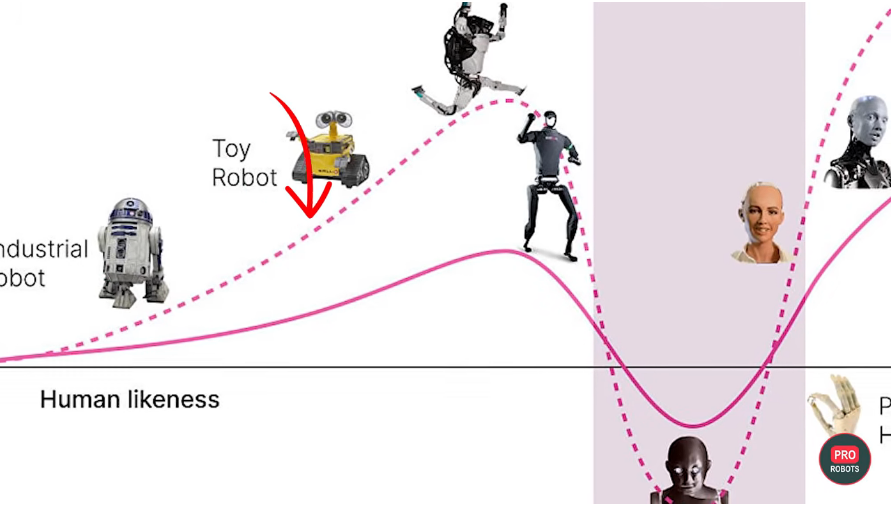
Why can almost-human robots feel unsettling?
The “uncanny valley” describes the discomfort some people feel toward almost-human robots or animated characters. You can prefer a practical machine shape; a robot does not need a human face to be useful.
Want a longer course?
Explore free online learning resources. Check the provider's current terms before signing up.
Selection reviewed 4 October 2026. The dance is a dated learning example; channels lead to changing collections rather than one promised latest video.